Free Auto Rig for Game Characters (Unreal, Unity)
Rig, animate and export a game character for free in the browser: a Mixamo-compatible skeleton, automatic skin weights, Idle and Walk clips and baked hair.
Rigging is where a lot of game projects stall. You have a character model, maybe one you generated with an AI tool or bought from an asset store, and getting it to stand, walk and jog in your engine suddenly means learning a 3D suite, a skeleton layout, and weight painting. This guide skips all of that. It uses Forge, a free tool that runs in the browser, to take a static character and hand it back as a game character: a skeleton inside it, skin weights that bind the surface to the bones, ready-made animations, and hair that swings. Then it gets the file into Unreal Engine.
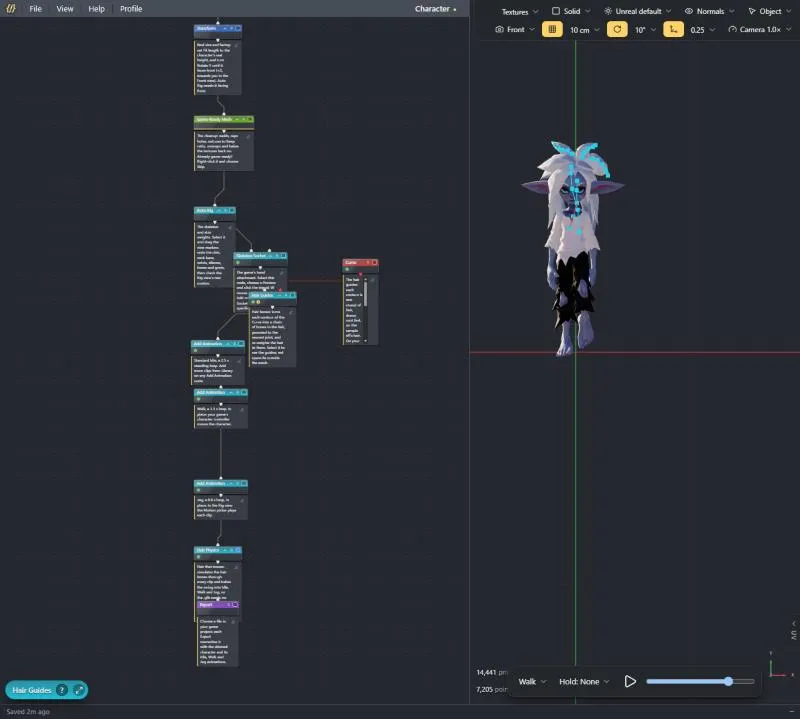
How the pipeline fits together
Every step is a node in one graph, so you can change any of them later and the character rebuilds. Only three are required: Import, Auto Rig and Export. The rest are optional.
- Prepare the model. Give it its real height, face it forward, and clean up an AI-generated mesh so it rigs well.
- Rig it. Place nine markers; Auto Rig builds the skeleton and the skin weights.
- Animate it. Add Idle, Walk or Jog, or your own Mixamo or Unreal Mannequin animation files.
- Give the hair motion. Bones for each clump of hair, then a simulation baked into every clip.
- Bring it into your engine. Export one
.glbor.fbxand import it into Unreal Engine.
Each card below covers one of those steps on its own page, so you can jump straight to the part you need.
The fastest route: the Character template
If you want a result today, open Forge and pick
Character under Create from Template on the start screen. The project opens on a sample
character that is already rigged, animated and has moving hair. Choose your own .glb on the
Import node, move the markers onto your character, and export. The pages below explain what each
node in that template is doing, so you know which knob to turn when something looks off.
What you need
- A humanoid character model as a
.glbor.gltffile: two arms, two legs, one head. - A Chromium browser (Chrome or Edge) if you want Export to write straight into your project folder. Other browsers download the file instead.
- A game engine to import into. This guide finishes in Unreal Engine; Unity and Godot work the same way from the same file.
No account, no install, and no 3D experience. The model never leaves your machine.
What it does not do yet
Be clear about the limits before you start. Auto Rig builds a human skeleton only, so quadrupeds, wings and tails are out. The bundled clips play in place, with no root motion: your character controller moves the character. And there is no hand keyframing; motion comes from the bundled clips or from animation files you already have.
Frequently asked questions
- Is there a free auto rigger for game characters?
- Yes. Forge is a free, browser-based tool with an Auto Rig node that builds a Mixamo-compatible skeleton inside a humanoid character and computes the skin weights for you. There is nothing to install, no account is needed, and what you export is yours to use in commercial games.
- Is this a Mixamo alternative?
- For humanoid characters, largely yes. Forge rigs the character itself, using Mixamo's joint names and bone directions, so Mixamo animations play on it unchanged. It also ships Idle, Walk and Jog clips, retargets your own Mixamo or Unreal Mannequin animation files, and bakes hair motion into the clips, all without uploading your model to a server.
- What kinds of characters can it rig?
- Humanoids: two arms, two legs and one head, standing upright in an A-pose or a T-pose. It does not rig quadrupeds, wings or tails. Fingers are rigged when the hand has five separate fingers.
- Which game engines can use the result?
- Any engine that imports glTF or FBX. Unreal Engine, Unity (with the glTFast package for .glb), Godot and Blender each import the exported file as a skinned character with every clip as its own animation.
- Do I need to know Blender or weight painting?
- No. You drag nine markers onto the character in a front view and the weights come from the shape of the surface. There is no weight painting and no bone editing.